AI finance assistant
Are you ahead or behind on your money goals?
ClarityTrack is the AI finance assistant that tells you if you're ahead or behind on your goals, then helps you close the gap.
30 days free. Card required, cancel before day 30 and you're not charged.
Sample data. No card, no signup.

Which sounds like you?
Just you
Know if you're ahead or behind on your goals, then close the gap.
From a user
This is awesome. My credit union's web interface looks nowhere near as good as this. Now I can actually see what I'm spending.
 Jonathan BowersClarityTrack user
Three things it does that a dashboard cannot.
It acts. It does not advise.
Ask for a change and Clarity shows you exactly what it will do. Confirm, and it writes the record. Anything hard to undo asks you first.
Personal and business, one login.
Switch to Business and the whole screen is the business: its own plan for the month, its own cash and what's committed over the next 30 days. Personal stays separate, and Clarity can still answer across both.
One surface. No dashboard to learn.
The conversation is the product. Ask a question, get an answer. Ask for a change, confirm it. There is no second place to go and nothing to configure first.
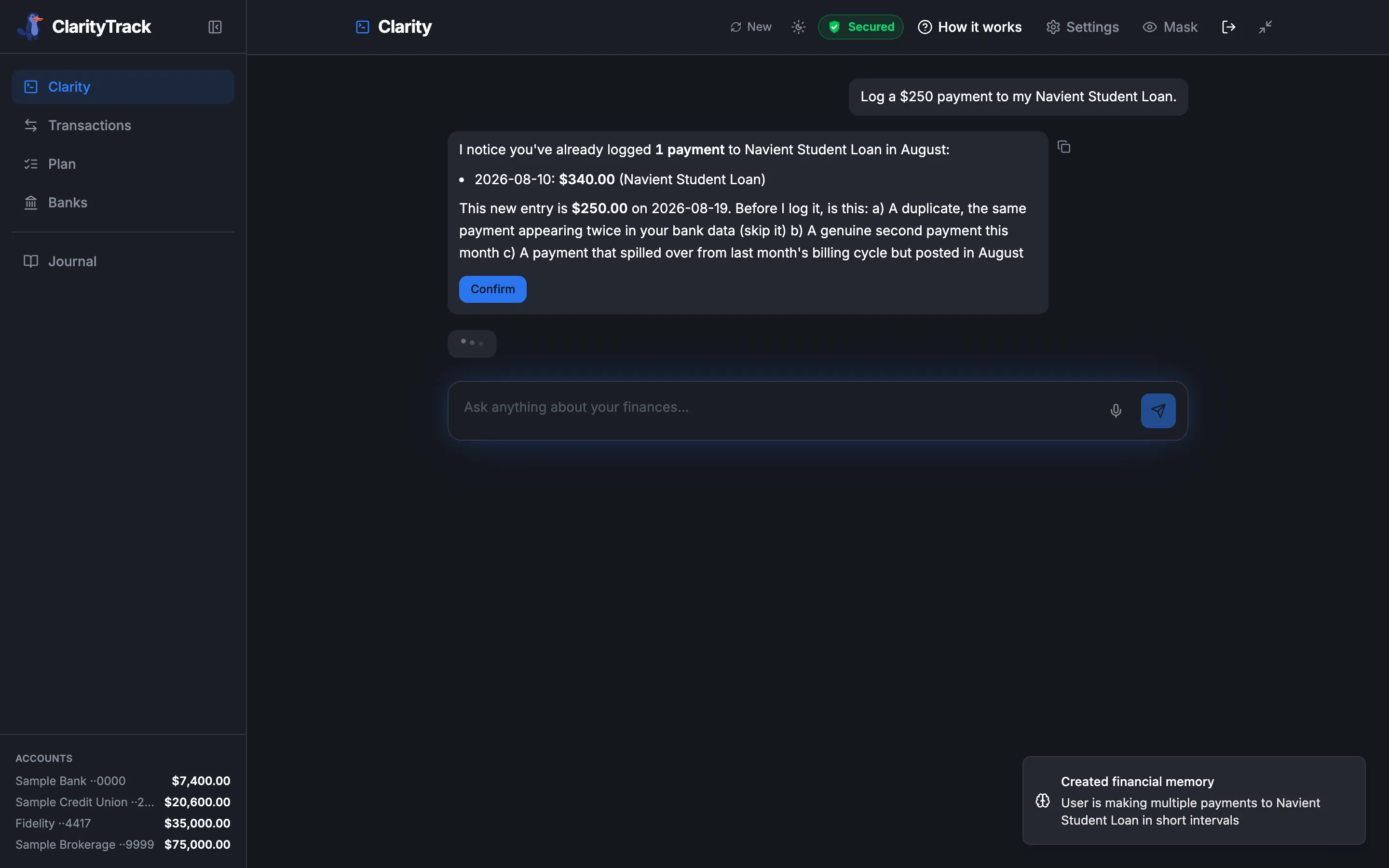
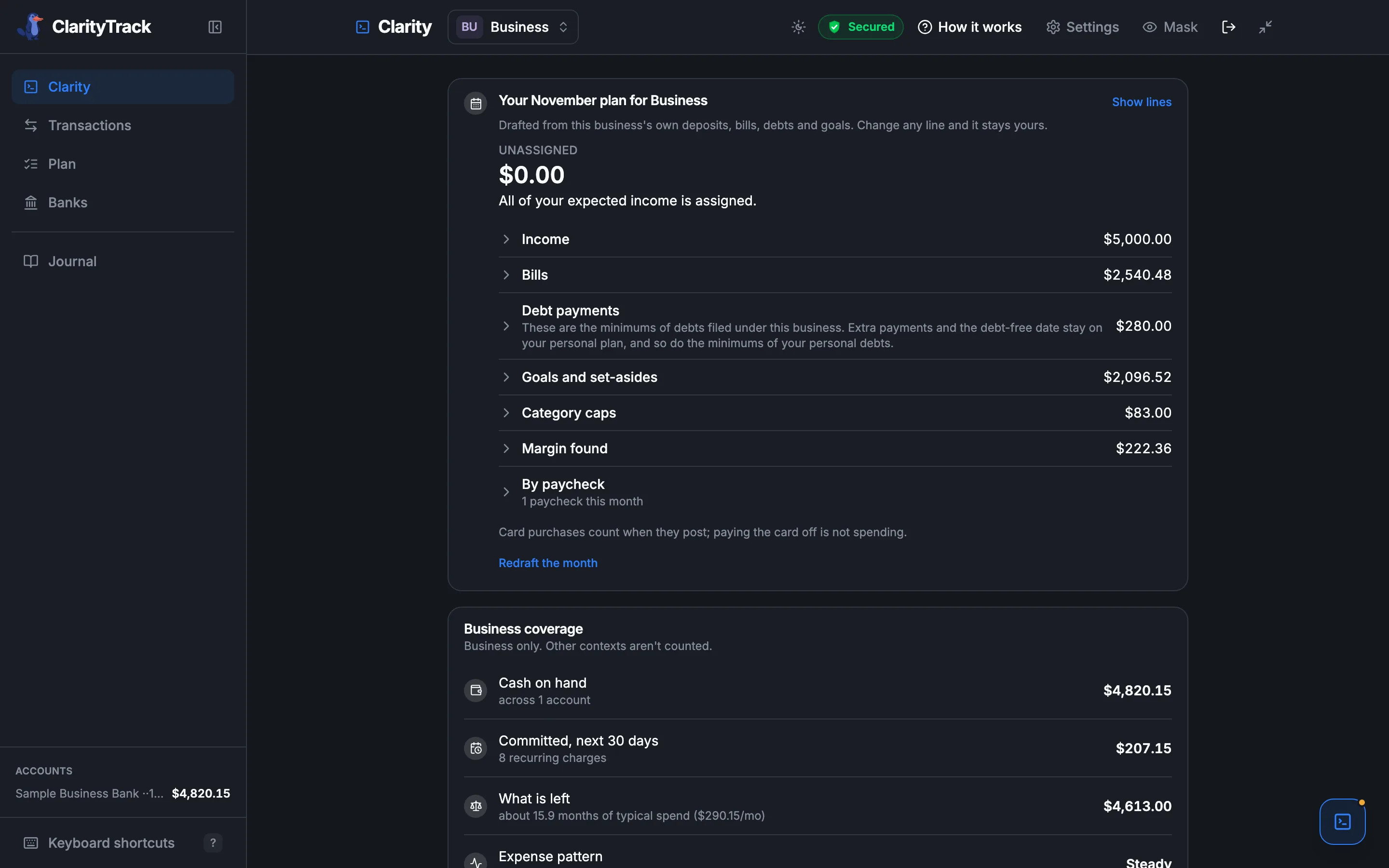
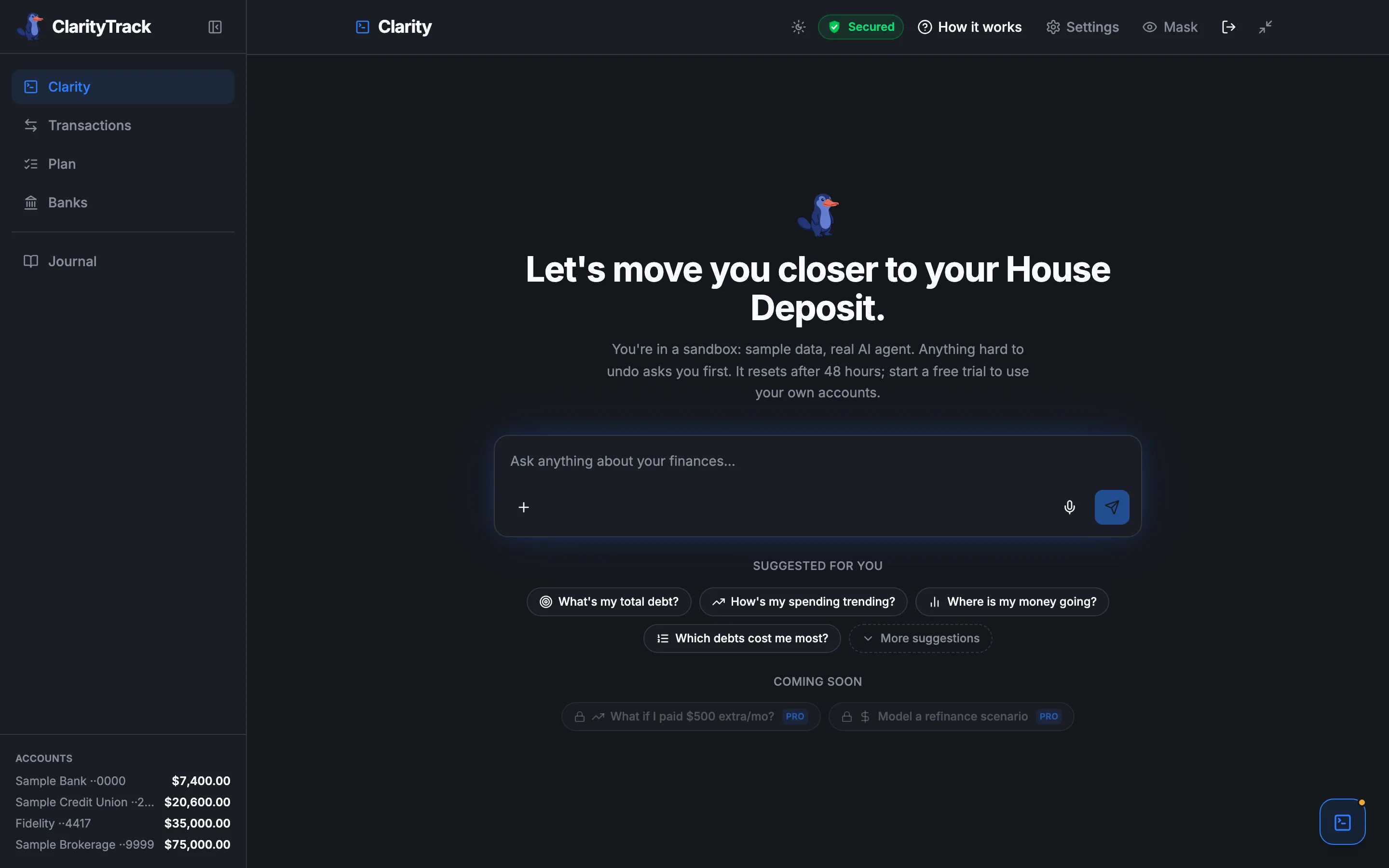
Captured from the live sandbox. The figures on screen are sample data, not a real user's finances.
52%
of Americans with credit card debt have no payoff plan
Bankrate, 2025
$11,149
average household revolving balance
NerdWallet, 2025
26%
know exactly when they will be debt-free
NerdWallet, 2025
You have statements, apps, and probably a spreadsheet. You know what you spent. You do not know where you stand.
Tracking payments is not the same as knowing where you stand.
Every goal gets a target and a straight answer: Ahead, On track, or Behind, with what it takes to hit your date. Ask Clarity "am I on track?" and it answers from your connected accounts, then helps you close the gap. Anything hard to undo waits for your yes.
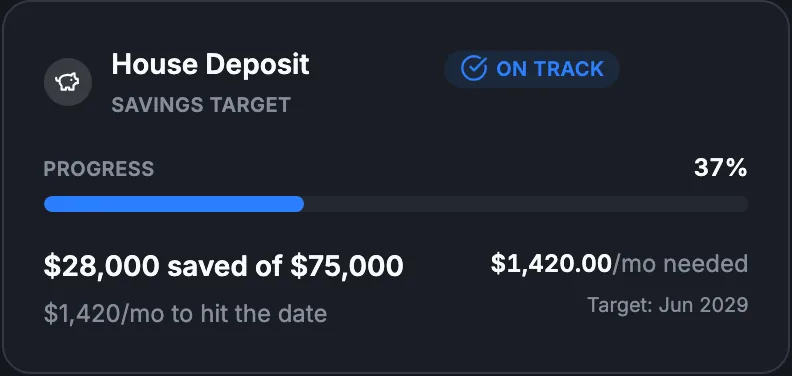
ON TRACK
$28,000 of $75,000 saved
An AI that already knows your numbers.
Clarity is the intelligence inside ClarityTrack. She already knows your debts, your balance, your target, and what you paid last month. When you ask a question, you do not have to explain your situation first.
She reads where you stand. She does not prescribe trades or strategies. She states facts: you are $28,000 toward a $75,000 deposit, and $1,420 a month gets you there by June 2029.
She confirms before acting on anything hard to undo. Logging a payment, changing your target, deleting a debt: each one waits for your go-ahead.
Where is my money going?
$3,710.14
August, 8 categories
Rent & Utilities
56%$2,076.98Food & Drink
15%$567.68Loan Payments
9%$340.00General Services
5%$189.14Transportation
4%$156.51
Your debts by total interest cost
$83.43
Monthly interest charges
Navient Student Loan
4.50% APR · $12,000.00 balance
/mo$45.00Chase Sapphire Card
20.94% APR · $2,200.00 balance
/mo$38.43
Ask, do not navigate
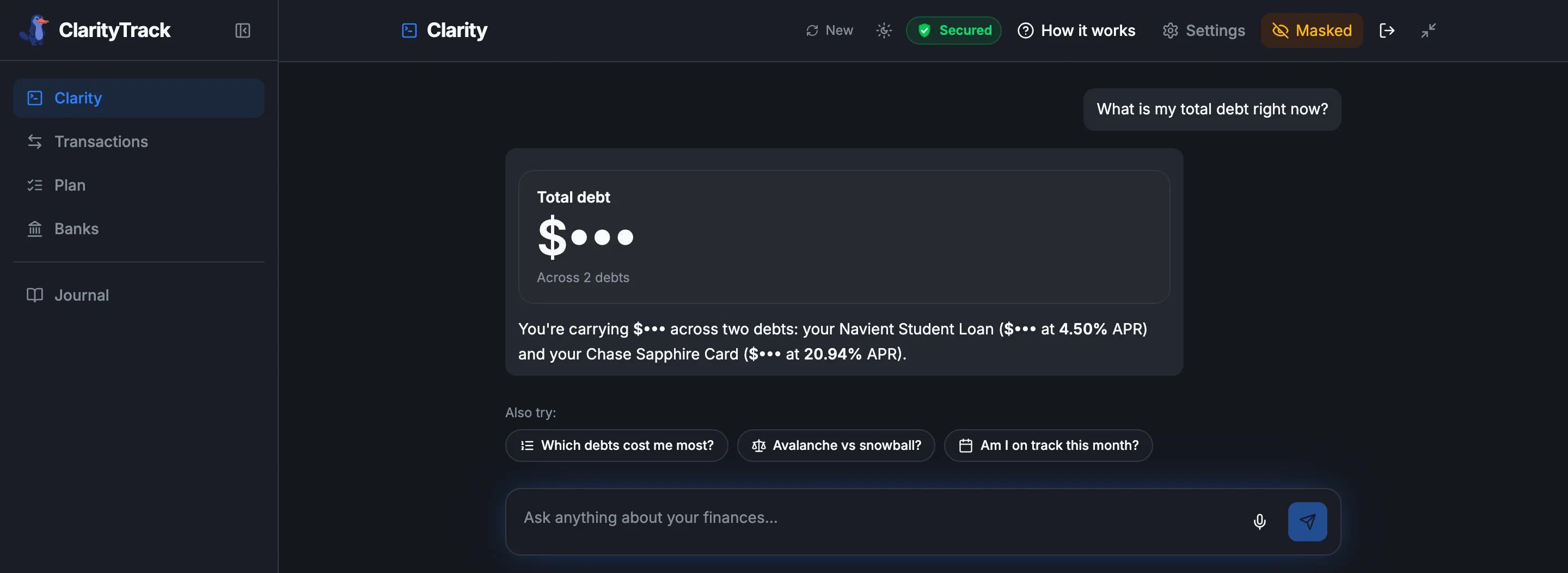
Every answer arrives as the right chart for the question.
Ask for a total and get one large number. Ask where the money goes and get a categorized breakdown. Ask what costs you most and get a ranked list with the fix underneath. No tabs to learn: the question picks the view.
Your finances. Not the coffee shop's.
One toggle masks every balance and amount across the entire app. Share your screen, leave your laptop open, check progress in public. The numbers disappear on demand.
50+ things Clarity can do. All conversational.
Anything hard to undo follows the same pattern: Clarity shows you a preview, you confirm, it executes. Small reversible edits apply right away and can be undone by asking.
Debt management
Pay off debt faster
Create debts, log payments, compare avalanche vs snowball, set payoff priority.
Budget categories
Set spending limits
Create and update category caps, track spend as your bank reports it, set alert thresholds.
Goal management
Track financial goals
Create, edit, pause, and resume goals with milestones and progress tracking.
Bank / Plaid
Split and categorize
Categories come with your bank feed. Split a charge across categories, annotate it, match manual entries, or set a rule so a merchant lands in the right category from the next sync on.
Forecasts
Look ahead
Next month's spending by category, from your own history. Or a month-by-month cash projection, up to 12 months out, with its assumptions and confidence shown.
Journal
Add financial context
Log notes, resolve disputes, attach files, export journal as PDF.
Data export
Export your data
CSV, full JSON (GDPR-style), and journal PDF, all from a single conversation.
Fixed obligations
Track recurring bills
Create, update, and delete recurring bills. Keep fixed costs visible.
Subscription management
Plan cancellations
Identify subscriptions, plan closures, track confirmation against bank feed.
Memory / settings
Control AI memory
View, pause, or permanently delete any memory Clarity has stored about you.
Ask. Preview. Confirm.
For anything hard to undo, Clarity shows you exactly what will change before it changes it. Smaller edits apply right away and can be undone by asking.
Example requests. Clarity answers from your own accounts.
Bring your own AI
Your finances, inside the AI you already use.
Anyone can help you set a goal now. ClarityTrack keeps it: on numbers that match your bank, aware of any relief program you've told it about, and updated every time money moves.
Connect ChatGPT, Claude, Grok or any Model Context Protocol client to your ClarityTrack account and ask where you stand. The answer comes from your real data, acting only as you. Writes stay off until you turn them on for a connection, and each one is previewed before it's committed.
Search ClarityTrack in ChatGPT. Connect in under a minute.
No URL to paste, no developer mode to enable. Open ChatGPT, search ClarityTrack in Apps, sign in with your ClarityTrack account, and start asking.
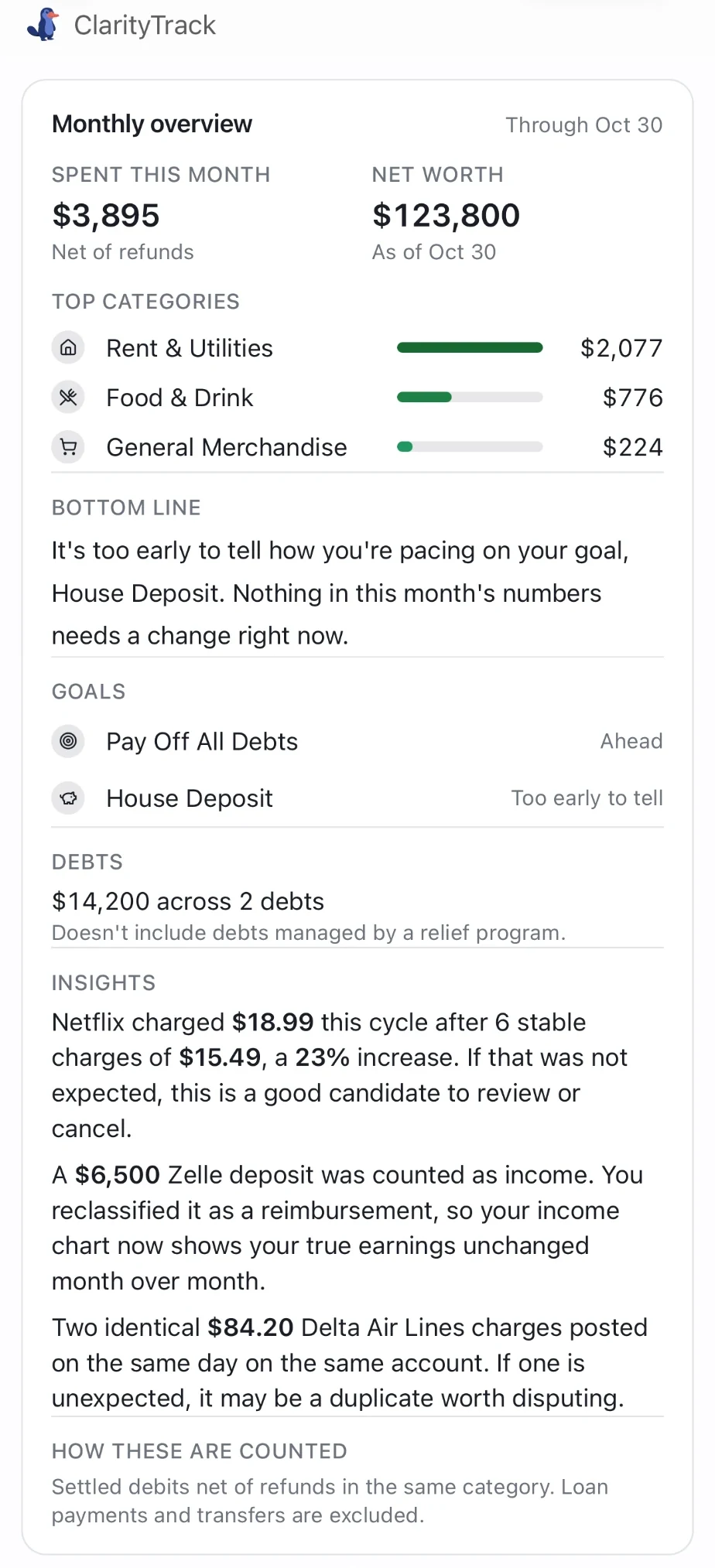
Inside ChatGPT, ClarityTrack keeps your plan the way it does here: on numbers that match your bank, and updated every time money moves.
Ask about your goals, your spending pace or your month, and the answer comes back as a ClarityTrack card right in the chat, not a wall of text. Works in ChatGPT, Claude and Grok.
Also in Claude and Grok
In Claude, open Settings, then Connectors, and add ClarityTrack as a custom connector.
In Grok, add ClarityTrack under Connectors as a custom connector.
Use this connector URL, then sign in with your ClarityTrack account and start asking.
https://www.claritytrack.ai/mcpOpt-in, off by default
Nothing connects until you personally authorize it, one connection at a time.
Read-only by default, acts as you
A connected assistant sees only your own data and can never move money. Write actions are off until you turn them on for that connection, and every one is previewed before it commits. Enforced by database Row-Level Security.
Full visibility
See every connected assistant, and a log of exactly what each one accessed, in Settings.
Revoke anytime
Cut off any connection instantly from Settings.
If you connect a third-party assistant, what it reads is shared with that provider under their terms, so connect only assistants you trust. See the Trust Center for the full disclosure.
Security
Your finances are yours. We can only see them.
ClarityTrack connects to your bank and email so Clarity can answer real questions about your money. Here is exactly what that means.
Connections go through Plaid. ClarityTrack can see your balances and transactions. It cannot move, send, or spend a single cent.
You choose exactly which senders we may read. We never see your password, never access your full inbox. Disconnect any time from Settings.
We do not sell your data. We do not use your financial information to train AI models. That is the default, not an opt-out.
Anything hard to undo requires cryptographically signed confirmation at three layers before it executes.

I built ClarityTrack so you always know where you stand.
Pricing
Personal for you. Business for the business too.
Both plans start with a 30-day free trial.
Personal
Know exactly where you stand, every day.
30 days free. Card required, cancel before day 30 and you're not charged.
$8.25/mo billed yearly.
- Connected banks, kept in sync
- Goals and the full financial journal
- Share a view with your partner, at no extra cost
Business
Know what the business has left after bills.
30 days free. Card required, cancel before day 30 and you're not charged.
Founding price for the first 100 subscribers, then $290 a year.
- Room for up to 5 financial contexts, so more than one company can sit alongside your personal money.
- One subscription covering both sides, not two.
A real sample workspace. No card, no signup.
Payments are handled by Stripe. Bank connections are read-only. See how we protect your data.
Questions
What people ask before they start.
ClarityTrack reads balances and transactions via Plaid. It never stores your bank credentials and cannot move money. Plaid connects to 12,000+ financial institutions and is used by Venmo, Robinhood, and Betterment.
Clarity reads your balances and transactions from your connected accounts through Plaid and works from those figures, not from numbers you typed or a model's guess. Categories come with your bank feed, and some will be off. Tell Clarity to put a merchant in the right category and it will, from the next sync on. Pending charges stay out of your monthly spending and income totals until they post. Anything Clarity changes is shown to you first and waits for your yes, so you can check it before it happens. If your bank is slow to update, a balance can lag until the next sync.
It can, and writing the plan is the easy part. ClarityTrack keeps it: it scores your payoff plan and each savings goal as ahead or behind on your home screen without being asked, on numbers that match your bank, and updates it every time money moves. Anything hard to undo is previewed and waits for your yes, and ClarityTrack never moves your money.
No. We'll show what concentration means for your goals, and we'll never tell you which stock to sell.
Import a CSV or PDF statement. ClarityTrack parses it and tracks your payments the same way as a live Plaid connection.
Yes. Cancel from your account settings at any time before the trial ends and you will not be charged. No email required, no support ticket.
It filters for people serious about their money. The demo workspace is available with no card and no signup if you want to explore the product first.
No. The question ClarityTrack answers is concrete either way: am I ahead or behind? That question drives a debt payoff, a house deposit, a monthly spending cap, or a financial independence number equally well. ClarityTrack tracks any financial obligation or goal with a target. The demo opens on a house-deposit goal so you can see one working end to end.
Business is the plan for business money, and it has features Personal doesn't. Personal covers one financial context for your own money and up to 2 connected Gmail inboxes. Business gives you up to 5 financial contexts and up to 5 connected Gmail inboxes, and it covers your personal finances in the same subscription. Only on Business: Ask what the business has left after the next 30 days of commitments, and the answer is built from its real cash, its upcoming bills, and how steady its spending has been, not a guess. A tax set-aside goal that counts business cash only, never your personal savings. Every account tagged personal or business, so a question can be asked of either side. See what you paid yourself from the business over the last 90 days and what you put into it, matched from transfers between your own bank accounts. App payments like Zelle and Venmo aren't counted. Know whether your pay from the business is steady, and see it flagged when a usual payment runs late. Every bank fee on the business account listed charge by charge, with what it costs over a year and a step that can get it waived. Next on the business plan: Have your plan pace itself against your pay from the business, so a missed payment changes the numbers. Count what a personal card pays for the business as money you put in, not only the transfers between your own accounts. If you are already over a limit, nothing is taken away: the limits apply when you add something new.
Yes, at no extra cost. Invite them from Settings and they sign in with their own login. They see your plan and balances, read-only, and they cannot change anything. Either of you can stop sharing at any time.
ClarityTrack is built around one question: are you ahead or behind on the goals you set? It reads every account, personal and business, answers that in one place, and can act on it when you ask: log a payment, set a budget, update a goal. Anything hard to undo is shown to you first and waits for your yes.
Not ready to connect your bank?
The demo workspace is a full financial life, matched to the goal you pick: debts, months of transactions, subscriptions, a portfolio, and a goal already in motion. Ask it for your net worth. On a personal demo, ask what your cash looks like in three months. No card, no signup.
What else is in here
The questions it answers.
Where do I actually stand?
Ask for your net worth and get one figure. Your totals stay true even for debt a bank feed cannot see, including balances being handled through a negotiation programme. Nothing is estimated away.
When could I stop working?
A guided interview sizes the number that would fund your life, then Coast FIRE scenarios show whether what you have already invested could get there on its own.
What if I paid more, or refinanced?
Model an extra payment or a refinance against your real balances and see the time and interest it buys back.
What should I do next?
Clarity ranks the next move against the goals you chose, with the reasoning shown, rather than a generic checklist.
Can my partner see this?
Share your plan and balances with your partner, read-only. They cannot change anything, and you can revoke it whenever you like.
Where do I even start?
Pick the situation that sounds like yours, from paying off a card to sizing a house deposit to planning for independence, and the workspace is set up around it.